
Key takeaway: Bundle size regressions are easy to detect and, without an analyzer, nearly impossible to attribute to a specific cause. Attribution is what actually enables a fix rather than just a complaint.
Why the Aggregate Number Alone Is Not Actionable
A CI check reporting that the production bundle grew by forty kilobytes since the last release tells you that something changed and nothing about what. The change could be a genuinely necessary new feature’s code, an accidentally imported entire library when only one function was needed, a duplicate copy of a dependency pulled in at two different versions by two different packages, or a development-only dependency that leaked into the production bundle by mistake.
Each of these has a completely different fix, and none of them are distinguishable from the aggregate size number alone — the number tells you there is a problem and nothing about which of several very different causes produced it.
What a Bundle Analyzer Actually Shows
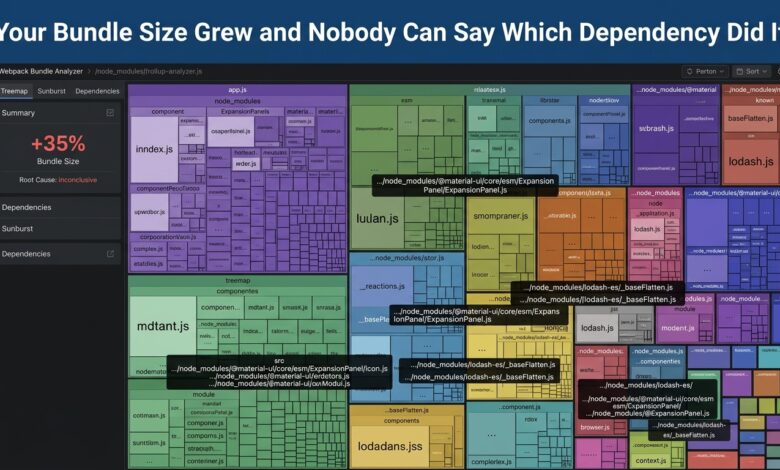
A bundle analyzer visualises the actual composition of the final bundle, typically as a size-proportional treemap, showing exactly which modules and dependencies contribute how many kilobytes, and critically, showing when a single library appears more than once at different versions because two different dependencies each required their own incompatible copy.
| Bundle problem | How it shows up in an analyzer |
|---|---|
| Importing a whole library for one function | Large single-package block for minimal usage |
| Duplicate dependency at two versions | Same package name appearing twice in the treemap |
| Accidental production inclusion of a dev tool | An unexpected large block that should not ship at all |
| Genuinely necessary new feature code | Expected growth in your own application code, not a dependency |
The duplicate-version case is particularly common and particularly easy to miss without visualisation, because each individual dependency’s own package.json looks entirely reasonable in isolation — the problem only becomes visible when you can see that two unrelated dependencies each pulled in their own copy of a shared underlying library at slightly different version ranges that could not be deduplicated.
Making This a Routine Check Rather Than an Occasional Investigation
Running a bundle analyzer as an occasional manual investigation, only when someone notices the application feels slow to load, catches problems long after they were introduced and after several more have likely accumulated on top. Running bundle size analysis automatically in CI, with a size budget that fails the build if exceeded, catches the specific commit that caused a regression while it is still fresh and easy to trace to a specific change.
Comparing the treemap output between builds, rather than only the aggregate number, additionally lets a reviewer see specifically which new dependency or which existing dependency’s growth caused a budget-exceeding change, which converts a failed CI check from a blocking annoyance into an actionable, specific piece of information.
Common Fixes Once You Know the Cause
Importing a specific named export rather than an entire library’s default export is often the fix for the “whole library for one function” case, provided the library supports tree-shaking correctly — not every library does, and the analyzer will reveal whether the specific import you are using is actually being tree-shaken or is pulling in the library’s full surface regardless.
Deduplication tooling in most modern package managers can often resolve the duplicate-version case automatically once identified, though sometimes it requires an explicit version override forcing two dependencies to share a single compatible version rather than each keeping their own.
The Bottom Line
Add bundle analysis to CI with an enforced size budget rather than treating it as an occasional manual investigation, and use the treemap visualisation specifically to attribute any regression to its actual cause rather than stopping at the aggregate number. Duplicate dependency versions and un-tree-shaken imports are the two most common causes worth checking first when a regression appears.