
Your Analytics Query Is Slow Because Row Storage Was the Wrong Choice

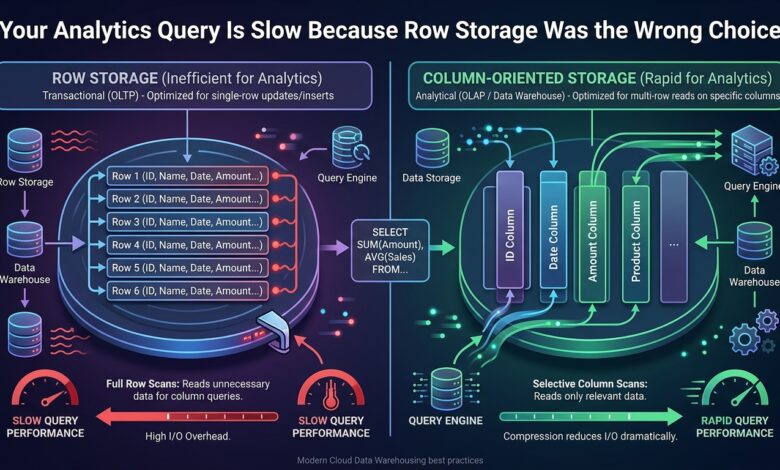
Key takeaway: Row and column storage optimise for opposite access patterns, and using the wrong one for your actual workload produces exactly the slow, hard-to-explain query performance that indexing alone cannot fix.
What the Two Layouts Actually Store
Row-oriented storage keeps all columns of a single record physically together on disk, which is efficient for retrieving or updating one complete record at a time — fetching an order, updating a customer profile, inserting a new row — because everything needed for that operation sits in one contiguous location.
Column-oriented storage instead groups each column’s values together across all records, which is efficient for operations that scan one or a few columns across many records, since reading a single column means reading only that column’s contiguous data rather than touching every other column of every row along the way.
Why This Determines Analytical Query Speed
An analytical query computing the average order value across a year of transactions needs exactly one column — the order amount — from potentially millions of rows. On row storage, retrieving that column still requires reading every row in full, including every other column that query does not need, because the storage layout physically interleaves them.
| Storage layout | Fast at | Slow at |
|---|---|---|
| Row-oriented | Fetching/updating one full record | Scanning one column across many records |
| Column-oriented | Scanning one or a few columns across many records | Fetching/updating one full record |
On column storage, the same query reads only the order-amount column’s data, skipping every other column entirely, which for a table with dozens of columns can mean reading a small fraction of the total data volume that row storage would have required for the identical logical query.
Why This Explains Confusing Performance Reports
A team running transactional workloads — looking up individual orders, updating individual customer records — on a row-oriented database, and increasingly also running analytical reporting queries against that same database, often finds the analytical queries slow in a way that adding an index does not meaningfully fix, because the fundamental issue is the storage layout’s mismatch with the access pattern, not a missing index that could route around it.
Indexing helps a row store find which rows match a filter faster; it does not change the fact that, once matching rows are found, retrieving one column from each still means reading the full row in a row-oriented layout. This is precisely why the standard advice for analytical workloads is a different storage engine or a separate replicated system, rather than more aggressive indexing of the same transactional store.
The Practical Architecture Response
Running transactional and analytical workloads against the same row-oriented database works acceptably at small scale and degrades specifically as analytical query volume or data size grows, which is why the common architecture separates them — a row-oriented database for transactional operations, replicating data into a column-oriented warehouse for analytical and reporting queries, so each workload runs against storage actually suited to its access pattern.
This separation also protects the transactional workload from analytical query load, since a long-running analytical scan against the transactional database can itself compete for resources with the latency-sensitive transactional queries that a production application depends on.
Deciding Which Workload You Actually Have
The test worth applying to a given query pattern is whether it typically needs most columns of few rows — transactional — or few columns of many rows — analytical. A workload with a genuine mix of both at meaningful volume is the case that specifically justifies maintaining both a transactional store and a separately replicated analytical warehouse, rather than trying to serve both patterns well from a single storage layout that can only be optimised for one.
The Bottom Line
Match storage layout to access pattern rather than defaulting to one database engine for every workload — row storage for transactional operations touching whole records, column storage for analytical queries scanning few columns across many rows. When both patterns exist at real volume, replicate into a separate analytical warehouse rather than expecting one storage engine to serve both well.