Automated Accessibility Scanners Catch a Fraction of What Actually Matters

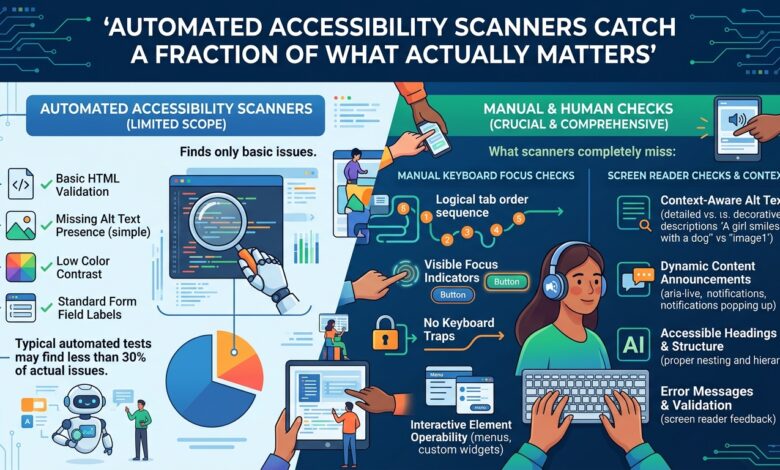
Key takeaway: Automated scanners reliably catch missing alt text, poor colour contrast and a handful of other mechanically checkable rules. They cannot evaluate whether the actual experience of navigating an interface with a screen reader or keyboard alone is coherent, which is most of what accessibility actually means in practice.
What Automated Tools Actually Check
Accessibility scanning tools excel at detecting a specific, well-defined category of issue — missing alt attributes on images, insufficient colour contrast ratios, missing form labels, invalid ARIA attribute usage, heading structure issues — because these are all properties that can be checked mechanically against the markup without needing to understand what the interface is actually trying to communicate to a user.
This is a genuinely valuable and worth-running category of check, and running it in CI on every change catches real regressions cheaply. It is also a small fraction of what determines whether an interface is actually usable by someone relying on assistive technology, because most of that depends on things a static analysis of markup cannot evaluate — whether the reading order of content makes logical sense, whether an interactive widget behaves the way a screen reader user would expect it to, whether a dynamic content update is actually announced.
What Automated Tools Cannot Catch
| Issue category | Caught by automated scanning |
|---|---|
| Missing alt text | Yes |
| Insufficient colour contrast | Yes |
| Missing form labels | Yes |
| Illogical reading or focus order | No |
| A custom dropdown that traps keyboard focus incorrectly | Partially at best |
| Dynamic content updates not announced to screen readers | No |
| Whether an interaction is actually usable, not just technically labelled | No |
The custom interactive widget category is where the gap is most consequential in practice — a custom dropdown, date picker, or modal dialog can have every ARIA attribute technically present and correctly named, passing every automated check cleanly, and still be genuinely unusable with a keyboard alone or with a screen reader, because the actual interactive behaviour — where focus moves, what gets announced, whether escape closes it, whether it traps keyboard focus appropriately or inappropriately — is a behavioural property that a static markup analysis simply cannot evaluate.
What Actually Catches the Rest
Manual testing by navigating the actual interface using only a keyboard, with no mouse at all, reveals a large share of practical accessibility problems directly — if a specific piece of functionality cannot be reached or operated without a mouse, that is immediately obvious this way, and it is exactly the category of issue automated scanning most reliably misses.
Testing with an actual screen reader, even briefly and even by someone who does not use one daily, surfaces a different and complementary set of problems — content read in a confusing order, an interactive element that is not announced as interactive at all, a dynamic update that occurs completely silently with no indication anything changed.
Including people who actually use assistive technology daily in testing, even briefly and even occasionally rather than for every single change, surfaces issues that a sighted developer’s occasional keyboard-only or screen-reader testing will still likely miss, because genuine everyday fluency with these tools reveals friction and confusion that an occasional, careful tester simply will not encounter the same way.
Making This Practical Rather Than Aspirational
Running automated scanning in CI for the mechanically checkable issues, and separately scheduling periodic manual keyboard and screen reader testing specifically for new or significantly changed interactive components, rather than treating manual testing as an occasional special initiative disconnected from the normal development cycle, integrates both layers into how accessibility is actually maintained on an ongoing basis, rather than only at occasional and infrequent points.
The Bottom Line
Run automated accessibility scanning in CI for what it can reliably catch, and treat a clean scan result as a floor rather than a finish line. Test new and changed interactive components manually with a keyboard alone and with an actual screen reader, since this is where most of what determines genuine usability for assistive technology users actually lives, and it is precisely what automated scanning structurally cannot evaluate.