
The Isolation Level You Choose Is a Promise About What Can Go Wrong

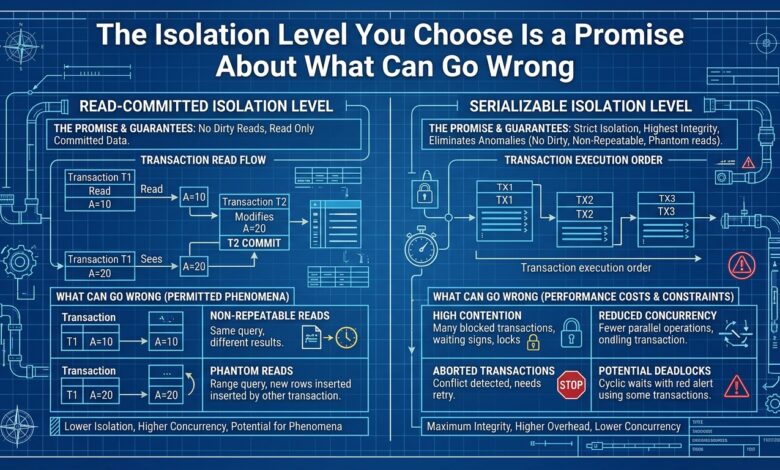
Key takeaway: Isolation levels are a deliberate trade-off between correctness guarantees and concurrency performance, and the default level of most databases permits anomalies that can produce genuinely wrong results if the application does not account for them.
What Isolation Levels Control
When multiple transactions run concurrently, they can interfere with each other in ways that produce incorrect results — reading data that another transaction later rolls back, reading different versions of the same data within one transaction, or having a transaction’s writes overwrite another’s. Isolation levels define which of these anomalies a database will prevent, and which it will allow, in exchange for allowing more concurrency.
| Anomaly | What it means |
|---|---|
| Dirty read | Reading data another transaction has written but not yet committed |
| Non-repeatable read | Reading different values for the same data within one transaction |
| Phantom read | A query returning different sets of rows within one transaction |
The strongest isolation level, serializable, prevents all of these by making concurrent transactions behave as though they ran one after another, and it does so at a significant performance cost because it restricts concurrency heavily. Weaker levels allow some anomalies in exchange for better concurrency and throughput.
The Default Level Is Not the Strongest
Most databases default to a level weaker than serializable — commonly read committed, which prevents dirty reads but allows non-repeatable and phantom reads, or repeatable read, which additionally prevents non-repeatable reads but still allows phantoms. This means an application that relies on the default level is implicitly accepting these anomalies unless it does something about them.
The practical consequence is that an application can produce subtly wrong results under concurrency — a transaction that reads a value, makes a decision based on it, and writes a result can be wrong if the value changed between the read and the write, because the default level did not prevent that change from happening concurrently.
When the Default Level Is a Problem
The default level is a problem specifically for operations that read some data, compute something based on it, and then write a result that depends on that read — a classic example being incrementing a counter or updating a balance based on a previously read value. Under a weak isolation level, two concurrent transactions can both read the same old value and both write based on it, losing one of the updates.
This is why the choice of isolation level matters most for operations with a read-modify-write pattern, and why such operations often need either a stronger isolation level, an explicit lock, or an atomic operation that the database provides, rather than relying on the default level to protect them.
Choosing Deliberately
The right approach is to understand what the default level of your database actually guarantees, and to use stronger isolation or explicit locking specifically for the operations that need it — the read-modify-write operations where a lost update would be a real correctness problem — while leaving the default level for the large majority of operations that are simple reads or writes and do not have this vulnerability.
The Bottom Line
Understand what your database’s default isolation level actually guarantees, since it is typically weaker than serializable and permits anomalies that can produce wrong results under concurrency. Use stronger isolation, explicit locking, or atomic operations specifically for read-modify-write patterns where a lost update would be a real correctness problem, rather than assuming the default level protects them.